'%20fill='%231C48DD'/%3e%3crect%20width='26.6139'%20height='7.01829'%20rx='3.50914'%20transform='matrix(-0.499958%20-0.866049%20-0.866001%200.500041%2037.7142%2021.771)'%20fill='%23FFCA29'/%3e%3cpath%20d='M13.4697%200C15.4076%20-8.4718e-08%2016.9794%201.57091%2016.9795%203.50879V20.4912C16.9794%2022.4291%2015.4076%2024%2013.4697%2024C11.532%2023.9998%209.96108%2022.4289%209.96094%2020.4912V7.01855H3.50977C1.57167%207.01855%200.00017846%205.44782%200%203.50977C-1.69425e-07%201.57156%201.57156%201.69462e-07%203.50977%200H13.4697Z'%20fill='%231C48DD'/%3e%3crect%20width='7.01887'%20height='7.01809'%20rx='3.50905'%20transform='matrix(-4.37066e-08%20-1%20-1%204.37162e-08%2054.5601%207.01886)'%20fill='%231C48DD'/%3e%3c/svg%3e)

 @tumwebsme
 Beach Kitchen
You already have a Facebook page — why do you need a website too?
People looking for somewhere to eat today start on Google Maps or search a restaurant's name directly before they ever open Facebook, and a growing number ask an AI assistant like ChatGPT or Gemini what's good nearby. Those tools read from websites and Google Business Profiles, not from scrolling through a Facebook page's post history — so a restaurant with only a page effectively disappears from that entire group of customers without realizing it.
The other problem you only notice once it happens: a Facebook menu post has a short shelf life. Once a customer scrolls past it, they rarely find their way back to the latest version — unlike a menu page on a website, which stays in the same place and stays viewable any time. And there's a bigger risk underneath that: pages do get suspended or hacked, which happens to plenty of businesses that put everything on one platform. When that happens, a restaurant with only a page loses its entire online presence at once, while one with its own website still has somewhere customers can find it.
Completeness matters more than it seems
The features above sound basic for any restaurant site, but in practice a lot of sites only cover part of the list — nice food photos with no booking system, or a booking system with a menu that's still an uneditable image. Customers deciding where to eat usually use several of these at once: browse the menu, check prices, check hours, then book a table. Miss one and they may well move on to a restaurant whose site covers all of it.
Getting found on Google Maps and local search
Restaurants are one of the most locally-searched business types there is — people type "restaurants near me" or a neighborhood name before deciding where to walk in. Basic local SEO matters more here than most restaurants realize, starting with connecting your Google Business Profile to your website so every detail matches: name, address, phone, and hours need to be identical across your site, Maps listing, and Facebook page, because mismatched information is exactly what quietly erodes how much Google trusts your listing.
A website that structures your restaurant's information correctly for Google — not just writing your address as plain text on a page, but marking up which part is the name, which is the address, and which is the opening hours — gives you a real shot at showing up in local search results and on Google Maps, something a site without that structure simply can't do.
This matters even more for restaurants with multiple branches or that have moved locations, since outdated listings sitting on review sites and directories will drag down trust in your restaurant if they don't match your current address. Your website should be the single most accurate source of truth, with every other channel then corrected to match it.
Custom code vs. off-the-shelf restaurant themes
Most restaurant sites built on off-the-shelf themes or WordPress just swap in photos and colors on a template. The menu is usually an image or a PDF the restaurant can't edit, so every price change means going back to whoever built the site. Before deciding, ask whoever's pitching you a template-based site these questions directly:
We write the digital menu and booking system from scratch because every restaurant organizes its menu, booking rules, and catering intake differently. Custom code adapts to how your restaurant actually operates instead of being stuck with whatever colors and fonts a theme happens to let you change.
That doesn't mean an off-the-shelf theme is unusable for every restaurant. A small place with a menu that rarely changes and no online booking can get by fine on a budget theme. But if your menu changes weekly, you take bookings regularly, and you plan to rely on the site as a lead channel for years, the questions above are worth asking clearly before you commit.
- When a price changes or an item sells out, can staff fix it themselves in a minute,or does someone have to message the web developer every time?
- Will the theme you bought still be maintainedthree years from now?
- Restaurants use more high-resolution food photography than almost any other business,and a site not built to handle that gets slower with every photo you add.
- How fast does the site load on a phone in direct sunlight outside the restaurant?A customer scanning a table QR code and waiting too long just calls a server over instead.
What a restaurant website actually needs
A restaurant site that holds up in the real world needs all of this, not just nice food photos:
- A digital menu your team can update prices or mark items sold out on immediately,no waiting on a new photo and repost
- Online table booking that sends requests straight to your restaurant's LINE,instead of customers messaging one by one to ask if a table's free
- Hours, parking, and location as text Google can actually read,not baked into an image
- A separate catering/events page for restaurants that takeoff-site or private event bookings
- Bilingual support for restaurants in tourist areas orwith a steady foreign customer base
- A table QR code that links straight to your own website,not a PDF menu nobody can update once it's uploaded
How we work
We start by gathering your menu structure and booking requirements in full — how many menu categories you run, how you want bookings handled, and whether you need a separate catering flow. From there we design and build the site, structure your restaurant's information so Google can read it correctly, connect the booking system to your LINE account, test everything before launch, and finish by training your team to manage the menu themselves, so everyone can update it from day one.
Along the way, we bring in the front-of-house staff or admin who'll actually manage the menu to test the management screen before launch, not after. The most common failure we see is a finished site that the restaurant's own team finds too awkward to use, so they quietly go back to asking someone else to update the menu for them. Involving the team early is what makes the system actually get used after launch, not just at handover.
- 1Step 1
Gathering your requirements
We talk about the venue, the menu, the atmosphere and the guests you want, and how you take bookings or orders today.
- 2Step 2
Requirement Analysis
We look at how guests find a venue on Google and maps, and put the scope and price in writing.
- 3Step 3
Web Design (UX/UI)
We design the menu page, food photos, location and booking button, for you to review before any code.
- 4Step 4
Development by experts
We write the code ourselves, ready for several languages, with a digital menu, a back office to edit it and the SEO structure.
- 5Step 5
System Testing
We test speed and the booking flow on a real phone, then send you a link to review before launch.
- 6Step 6
Website Usage Training
We teach your team the back office for changing the menu, prices, promotions and photos.
- 7Step 7
Your website is ready
We launch on your real domain, help set the venue up on maps, and keep looking after the site once it is handed over.
Restaurant and hospitality work we have delivered
Prym Brunch and Bar, a restaurant in the Bang Rak area, got a bilingual website with a digital menu the restaurant can edit prices and items on themselves, plus a separate catering page for customers planning events — built so both Thai and foreign customers working or living in the area can find everything about the restaurant in one place.
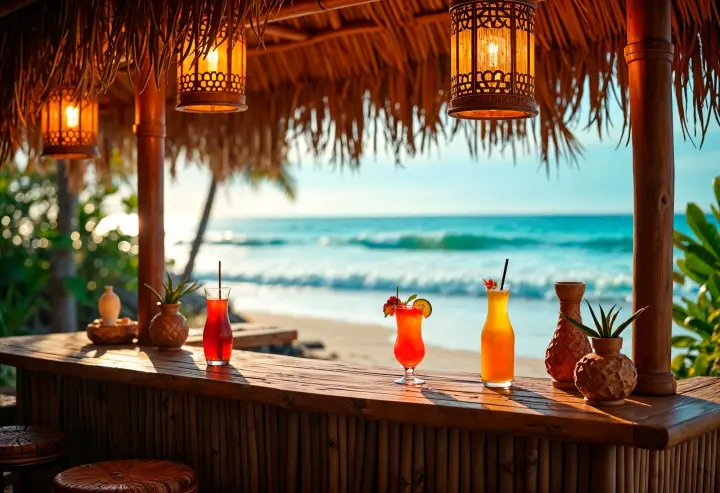
A beach club in Phuket whose customer base is mostly foreign visitors got a website designed so international travelers can find the venue's details, menu, and booking contact before they even arrive — essential for a hospitality business in a tourist destination where most customers plan ahead from abroad.


Website package pricing
Standard
Corporate Website Development – SEO & AI Search Ready
Suits most business websites. The package is the same in every area and every industry; the final price is estimated from the scope of work, and the estimate is free.
Starting at Full price ฿169,000
฿119,000
One Stop Service price (save THB 50,000)
Prices exclude 7% VAT
What the package includes
- Website6 Pages
- Languages2 Languages
- Free After-Sales Care6 Months
- Free SEO Articles2 Articles
- Free Traffic Report6 Months
What is not included
What is left out, we say plainly: monthly Cloud+ hosting if you choose One Stop Service (if you take the code and run it yourself, the server cost is yours), the domain once the free period under the package and agreement ends, and features outside the agreed scope. If you want to add any later, we price it for you before we start.
Pay in instalments
Pay in instalments against work you can see. As the project moves forward, you pay as it goes.
Every website is different, and so is the price. Tell us what you need first and we estimate it for free.
See all package detailsFrequently asked questions
Questions customers in the restaurant trade ask us most
We already have a Facebook page for the restaurant — do we still need a website?
Yes. Many customers now search for restaurants on Google Maps and increasingly ask AI assistants such as ChatGPT or Gemini before deciding, and those tools read from websites and Google Business Profiles, not Facebook post history. Facebook menu posts are also short-lived, unlike a menu page on your own site, which stays put and can be opened anytime. And if the page is ever suspended or hacked, a restaurant with its own website still has somewhere customers can find it.
Prices and sold-out items change often — can our team update the menu ourselves?
Yes. With the digital menu we build, your team can edit prices, mark items sold out or add new dishes through a simple management screen, with no technical skills required and no waiting on a new menu photo to be made and reposted. We also have the front-of-house staff or admin who will actually manage the menu try the screen before launch, so we know it is easy enough to use from day one.
How does the table booking system work?
Customers fill out a booking form on your website, and the request goes straight to your restaurant's LINE. Your team sees it and can respond faster, instead of answering messages one by one asking if a table is free, as a Facebook page alone requires. We collect your booking rules before we start and write the form to match how your restaurant really works, rather than using the same generic form for every venue.
We also do catering and private events — can that go on the site?
Yes. We build a separate catering/events page apart from your regular menu, so customers looking to book an event or off-site catering can find the right information and contact point without it getting mixed in with dine-in menu content. Prym Brunch and Bar, a restaurant in Bang Rak, has exactly this: a separate catering page for customers planning events.
We're in a tourist area with foreign customers — do we need a bilingual site?
We'd recommend it. Foreign visitors to tourist destinations typically plan their dining out ahead of time, often before they even arrive in the country. A bilingual site lets them find your restaurant, menu and booking channel in advance. We have built for a Phuket beach club whose customers are mostly foreign visitors, and a bilingual site for Prym Brunch and Bar. Your team can edit both languages themselves from the management screen.
How long does a restaurant website project take?
Typically about 4–8 weeks, depending on how complex your menu and booking setup needs to be: the number of menu categories, booking rules, and whether you need a separate catering page. We gather your menu structure and booking requirements in full before work starts, so we can give you an accurate timeline for your restaurant specifically, and we can give a free scope estimate after a first chat.
We have multiple branches — can one website cover all of them?
Yes. The site can be structured to show each branch's address, hours and menu separately within one site. What we need to clarify upfront is how much the menu or booking rules differ between branches, so the information structure is set up correctly from day one. Every branch's details should also match your Google Business Profile, because outdated listings elsewhere drag down trust in your restaurant.
Can a table QR code open the menu on our own website?
Yes. The QR code on each table links straight to the menu page on your own website, not to a PDF that cannot be edited once uploaded. When you change a price or mark an item sold out in the management screen, the menu customers see changes with it. The site is custom-coded and mobile-first so it opens fast on a phone even with a lot of food photography, because a customer who scans and waits too long just calls a server over instead.
Why is One Stop Service ฿50,000 cheaper than the full price?
One Stop Service costs ฿50,000 less than the full price because we take the source-code handover out of the job. Your website stays on our system: we keep the code and look after the server, security and updates on an ongoing basis, so you do not need an IT team of your own and do not pay to move the code somewhere else. What is still charged monthly is Cloud+ hosting, billed separately from the build. You own the copyright either way, and if you later want to take the source code over yourself you can pay the discount back and receive it. The full price is the option where you take the system and the source code from the day of handover, which suits businesses with their own IT team.
What exactly is the ฿50,000 you save with One Stop Service?
The ฿50,000 is the source-code handover fee, which covers nine pieces of work: preparing the source code so another team can open it and carry on; exporting all content, images and the database; detailed manuals and tutorials (how to install, deploy, and how the system is structured); coordinating with your IT team; moving the domain, DNS and SSL without taking the site down; handing over passwords and keys and then changing them all; checking the licences of fonts, images and libraries; a joint acceptance check before the job closes; and following up until the site is really running on your own system. With One Stop Service the site stays with us, so that work is not billed. The website itself, its pages, content and features, is identical to the full-price version.
Restaurant Website Development — Editable Menu and Online Booking
We scope and price it for free before you decide
Related articles
View All Articles 2026-03-2340 views
Increase Restaurant Reservations with an Automated Online Booking System
Web Development PortfolioTransform your website into a 24/7 receptionist with an online booking system. Increase reservations, reduce errors, and build customer data.
 2026-07-16175 views
Phuket Restaurant Website Design | Drive Bookings & SEO by TumWebSME
SEO and Online MarketingProfessional Phuket restaurant website design services. Boost direct bookings with online menus, reservation systems, and Local SEO. Contact TumWebSME today!
 2026-07-21153 views
Restaurant and Cafe Website Design in Ratchaburi
TumWebSMEElevate your Ratchaburi restaurant or cafe with a professional website featuring online menus, automated booking, and delivery systems.


