'%20fill='%231C48DD'/%3e%3crect%20width='26.6139'%20height='7.01829'%20rx='3.50914'%20transform='matrix(-0.499958%20-0.866049%20-0.866001%200.500041%2037.7142%2021.771)'%20fill='%23FFCA29'/%3e%3cpath%20d='M13.4697%200C15.4076%20-8.4718e-08%2016.9794%201.57091%2016.9795%203.50879V20.4912C16.9794%2022.4291%2015.4076%2024%2013.4697%2024C11.532%2023.9998%209.96108%2022.4289%209.96094%2020.4912V7.01855H3.50977C1.57167%207.01855%200.00017846%205.44782%200%203.50977C-1.69425e-07%201.57156%201.57156%201.69462e-07%203.50977%200H13.4697Z'%20fill='%231C48DD'/%3e%3crect%20width='7.01887'%20height='7.01809'%20rx='3.50905'%20transform='matrix(-4.37066e-08%20-1%20-1%204.37162e-08%2054.5601%207.01886)'%20fill='%231C48DD'/%3e%3c/svg%3e)


A successful business website does more than just look pretty. It needs a solid Website Structure that prioritizes user experience (UX/UI) and aligns with Google's guidelines (SEO) to ensure potential clients can find you easily.
Whether you are launching a brand-new site or upgrading an existing one, here are the 10 essential website components you cannot afford to miss, along with strategic placement tips to convert casual visitors into paying customers.
What Components Make Up a Website?
Think of your website as a digital storefront or a house. Building a functional site requires various elements to work seamlessly together, rather than just having a roof and a door.
For a business website, these elements are divided into 3 main categories based on their functions:
Core Structure: The foundation that shapes your site and guides visitors, such as the Header, Navigation Menu, and Footer. These remain consistent across all pages for easy browsing.
Conversion & Content Features: The main stage used to showcase your products, services, reviews, and contact buttons. This area is critical for converting traffic into actual sales.
Specialized Systems: Extra features tailored to specific industries, such as a shopping cart for E-commerce or a booking calendar for service-based businesses.
Missing any of these components can hurt your site's performance, leaving you with a page that only provides information but fails to generate revenue.
Let’s dive into the 10 essential components your business website needs to maximize conversions:
1. Header
The Header is the top section of your website that appears on every page. It acts as your digital storefront sign and main entrance. It must be clean, clear, and instantly tell visitors whose website they are on.
Logo: Place it prominently (usually on the top left) and make sure it links back to the homepage.
Tagline / Business Name: A brief statement that immediately explains what your business does so customers aren't left guessing.
Call-to-Action (CTA) Button: High-visibility buttons like "Contact Us" or "Get a Quote" should be placed on the top right to make reaching out effortless.
Pro Tip: Use a Sticky Header (keeps the menu visible as users scroll down) for effortless navigation, and ensure it collapses into a Hamburger Menu (3-line icon) on mobile screens to save space.
2. Navigation Menu
The Navigation Menu is the main directory linking to important pages on your site. Think of it as a mall directory that helps users find exactly what they want. A well-designed menu reduces your Bounce Rate significantly.
Keep it Concise: Stick to 5–7 main menu items to avoid overwhelming or confusing your visitors.
Use Simple Language: Stick to familiar, clear terms like Home, About Us, Services, Portfolio, and Contact Us. Avoid industry jargon that your clients might not understand.
Active State Indication: Highlight or underline the menu item of the page the user is currently viewing so they always know where they are.
3. Hero Section
The Hero Section is the space at the top of your homepage, also known as Above the Fold. This is what users see before they start scrolling. It is your ultimate real estate because you only have 3–5 seconds to grab their attention.
Clear Headline: A bold title focused on the "benefits" the customer gets. For example, instead of a plain “Website Development Company,” use “High-Converting, Beautiful Websites Built for SEO.”
Subheadline: A brief 1–2 sentence elaboration that adds context to your main headline.
High-Quality Visuals: Use real photos of your team, brand, or projects to build authenticity. Avoid generic stock photos found everywhere on the internet.
Prominent CTA: A button that encourages immediate action, like "Free Consultation" or "View Our Work," using a color that stands out against the background.
4. About & Service Overview
The About & Service Overview section answers your customers' ultimate questions: "Who are you?" and "Why should I choose you?" This section builds the necessary trust and credibility before a customer decides to buy.
Unique Selling Proposition (USP): Briefly explain what makes your business different and better than competitors.
Service Summary: Break down your core products or services into bullet points or clean blocks so they are easy to scan.
Measurable Success: Use real stats or data to instantly boost credibility, such as “10+ years of industry experience” or “Over 500 websites delivered successfully.”
Customer-Centric Approach: Shift from just talking about yourself (“We are experts in...”) to focusing on what the client gains (“Get a website that...”). This keeps the reader engaged.
5. Social Proof
Social Proof collects concrete evidence to prove that your business is real, reputable, and delivers on its promises. This section breaks down hesitation and speeds up buying decisions.
Testimonials: Quotes from real clients. Adding their photos, names, or job titles increases credibility exponentially.
Client / Partner Logos: If you've worked with well-known brands or industry leaders, displaying their logos borrows their authority and instantly elevates your brand.
Case Studies: Brief stories showing how you solved problems for past clients, highlighting measurable results like “Boosted client sales by 40% within 3 months.”
Awards & Certifications: Display industry awards, safety badges (like SSL certs), or official accreditations to solidify trust.
6. Content Sections
Content Sections provide valuable information to your audience. This isn't just about making your site look informative; it is a strategic SEO powerhouse designed to pull free, organic traffic from Google.
Blog / Articles: A space to share tips, guides, or industry insights. By naturally weaving in keywords your audience searches for, you can rank on Google and attract free visitors.
Frequently Asked Questions (FAQ): Group common questions together and answer them clearly. This saves your support team time and can be optimized with FAQ Schema code to display answers directly on Google search results.
Page Layout (UX): Avoid massive walls of text. Use plenty of White Space, organize content with headings (H2, H3), and use graphics or photos to keep the reading experience effortless.
7. Call-to-Action (CTA)
A Call-to-Action (CTA) is a striking button or text that guides users toward the next step, ensuring you don't lose sales opportunities. A website without clear CTAs is like a great salesman who forgets to ask for the order.
Use Action Verbs: Keep it short, actionable, and result-oriented, such as “Sign Up Now,” “Download Free E-Book,” or “Book a Free Consultation.” Avoid vague text like “Click Here.”
Make it Stand Out: Ensure the CTA button is highly visible. Use contrasting colors, make it large enough to tap easily on mobile, and leave breathing room around it.
Strategic Placement: Place them in the Hero Section, space them naturally between major content blocks, and place a final one at the bottom of the page to catch users who read until the end.
8. Footer
The Footer is the bottom-most area of your website. It serves as your "back-office customer service desk." Users who scroll all the way down here are highly interested prospects looking for specific details to contact you or verify your legitimacy.
Essential Navigation Links: Group links to key internal pages like Services, About Us, Contact Us, and crucial legal pages like your Privacy Policy.
Contact Info & Socials: Clearly state your phone number, email, and physical address, alongside icon links to channels like Facebook or LINE OA.
Google Map Integration: Embedding a map adds immense credibility and makes it seamless for clients to navigate to your office, store, or factory.
Copyright Text: Display ownership details alongside the current year to maintain a professional, up-to-date look.
Clean Grid Layout: Avoid overcrowding. Organize footer information into neat columns so it stays easy to read.
9. Search & Filter
A Search & Filter system is essential for websites hosting a lot of data, products, or content—such as E-commerce stores, real estate platforms, or large-scale blogs. This saves users from digging through pages manually and bouncing off out of frustration.
Visible Search Bar: Place it somewhere obvious (like the Header) and implement Autocomplete to suggest relevant terms as they type.
Smart Filters: Make filtering intuitive by breaking choices down into clear categories like price ranges, brands, sizes, colors, or popular tags.
UX Best Practices: Display search and filter results in real-time (without reloading the whole page) and show the number of results found so users understand their options.
10. Chat & Contact Widget
A Chat & Contact Widget is a direct shortcut to get in touch with your team. This is your final closing tool. Since many customers prefer chatting with a real person before making a purchase, a sticky chat button ensures they can reach you instantly.
Popular Channels: Connect to platforms your audience uses daily, such as LINE Official Account (LINE OA), Facebook Messenger, or WhatsApp for international client bases.
Live Chat Systems: For B2B or corporate-level sites, adding an onsite live chat (like Tidio or Intercom) helps qualify leads efficiently and provides a global, professional image.
Placement: Design it as a Floating Button pinned to the bottom right corner of the screen. Keep it small enough so it doesn't block important text or interactive buttons on mobile displays.
Industry-Specific Components
Beyond the 10 core elements, different business models require specialized features to cater to their target audience and secure conversions:
E-Commerce Websites
Online stores must prioritize features that make shopping smooth, frictionless, and secure:
Product Detail Page: Deep-dive product pages featuring high-resolution multi-angle photos, clear sizing/specs, and real customer reviews.
Shopping Cart & Checkout: A seamless, straightforward checkout process supporting various payment options like Bank Transfers, QR Code Scanning, or Credit Cards.
Order Tracking: A built-in portal where customers can monitor their order status and tracking numbers in real-time, reducing customer support loads.
Service-Based Websites
For service providers, trust and professionalism are everything. The website must guide users toward getting in touch or scheduling an appointment:
Detailed Service Pages: Deep dives into your service offerings, project scopes, and working processes so clients know exactly what they are getting.
Online Booking System: Automated booking features allowing clients to check availability and schedule consultations directly on your site.
Team Page: Profiles and photos of your experts or executives to show clients they are working with industry professionals.
Restaurant & Hotel Websites
These industries sell experiences and emotions. Your website must focus heavily on rich, striking visuals that pull users in:
Digital Menu / Room Gallery: Beautiful, high-resolution galleries showcasing mouthwatering dishes or crisp room layouts to encourage bookings.
Booking & Reservation: Real-time table or room availability checks with instant booking capabilities, securing sales without needing an admin's response.
Virtual Tour: Embedded 360-degree tours allowing prospects to digitally walk through your space before making a reservation.
Portfolios Developed by TumWebSME
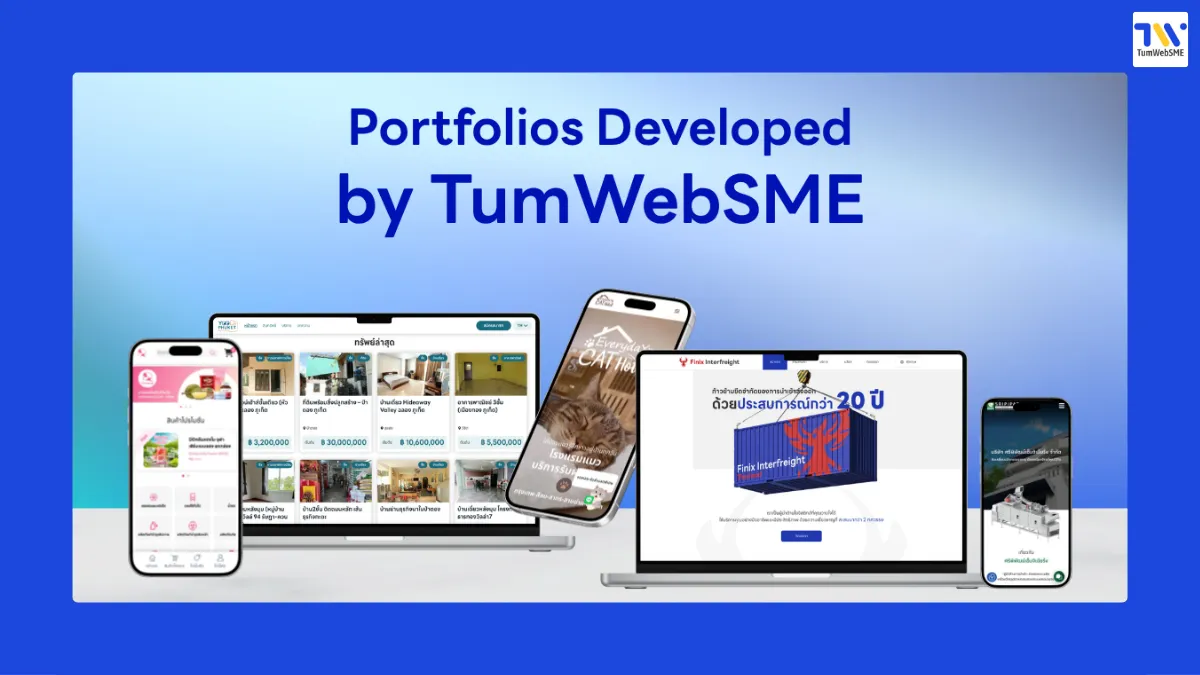
Proven by real results, TumWebSME has earned the trust of businesses across various industries. We turn website structure theories into high-converting, functional digital assets:
Sri Pipat Engineering Co., Ltd. (Manufacturing): Built an industrial machinery catalog website that elevates brand authority and features an easy-to-update backend system.
YOO Phuket (Real Estate): A full-scale real estate marketplace for buying, selling, and renting properties in Phuket, supporting step-by-step agent listings and built with deep SEO structure.
NamtanZhongli (Cross-Border E-Commerce): A shopping platform connecting Thai products to Thai communities in Taiwan, built with a Mobile-First design, strict order management systems, and targeted local SEO.
Everyday Cat Hotel (Pet Services & Hospitality): A premium cat hotel in the Silom-Sathorn district. Built with a cozy design, mobile-friendly booking system, and Local SEO targeting "cat hotel near me."
FINIX INTERFREIGHT (Logistics & Freight): A global freight forwarding website built to display international credibility, covering land, sea, and air services while leveraging SEO to capture new corporate leads.
Website Development Steps with TumWebSME
To ensure all these elements work together flawlessly, the expert team at TumWebSME guides you through every step of the development process:
Requirement Gathering: We listen to your goals, analyze your target market, and define your core business objectives.
Analysis & Planning: We scope out requirements, select the ideal technology stack, and map out your site's architecture (Sitemap).
UX/UI Design: We craft modern, stunning interfaces tailored to your brand identity that provide an effortless user experience.
Custom Code Development: Our professional developers write your site from scratch, creating lightning-fast loading speeds, ironclad security, and readiness for AI-driven search engines.
System Testing: We rigorously test features, links, and cross-device responsiveness before going live.
Training & Handover: We walk you through our intuitive backend manager so your team can effortlessly update content on your own.
After-Sales Service: Enjoy continuous support and maintenance checks for absolute peace of mind.
Website Development Services for SMEs
A beautiful website is pointless if it doesn't make money. At TumWebSME, we build websites tailored specifically for growing businesses, transforming them into 24/7 sales machines:
Custom-Coded for Your Business: We do not use bloated, generic pre-made templates. Our developers build clean code from scratch, creating blazing-fast speeds, high security, and maximum efficiency.
Fully SEO-Optimized Foundations: We align your site structure with Google's core algorithm from day one, giving you a massive head start to rank on page one.
Conversion-Driven UX/UI Design: Every single element, from your Hero Section to your CTA buttons, is placed strategically to guide traffic into sales.
Mobile-First Responsiveness: Your site will look stunning, load fast, and work perfectly across smartphones, tablets, and desktop computers.
User-Friendly Backend Management: Our backend systems are stable and highly intuitive, letting you update products, blogs, or services yourself without needing a developer.
Frequently Asked Questions (FAQ)
Q1. What is the most critical component of a business website?
A: All 10 components work together, but elements like a clear Header, an engaging Hero Section, trustworthy Social Proof, and prominent Call-to-Action (CTA) buttons are vital for turning visitors into buyers.
Q2. Why should businesses choose Custom Code over templates?
A: Custom-coded sites are faster, more secure, and free of unnecessary code bloating. This yields excellent Core Web Vitals scores, which helps your site rank much higher on Google (SEO) compared to generic templates.
Q3. How does proper website structure increase conversion rates?
A: Good structure provides clear navigation based on UX/UI best practices. By making info easy to find and placing Chat Widgets and CTAs within easy reach, users can take action instantly before losing interest.
Q4. Why is Mobile-First design non-negotiable?
A: The majority of web traffic happens on mobile devices. Google prioritizes mobile responsiveness when ranking sites. A mobile-first approach keeps users happy and satisfies Google's ranking criteria.
Summary
Every core element of a business website—from the first impression of the Header to clear navigation, persuasive social proof, and seamless contact buttons—must work together toward a single goal. That is the difference between an average page and a website that actively scales your business.
Ready to Build a Website That Actually Sells?
If you want a team that truly understands SME growth and is ready to design a website that works tirelessly for your business, TumWebSME is your partner. We handle everything from planning to launch and long-term support.
Get a free consultation today. Let’s map out the perfect custom structure for your business.
Free Consultation Before You Decide:
Facebook: TumWebSME รับทำเว็บไซต์ธุรกิจ
Instagram: @tumwebsme
TikTok: @tumwebsme
YouTube: TumWebSME
Contact Us & Project Inquiries
088-983-9386 (Ploy)
099-856-3198 (Sannan)


 @tumwebsme

